
Slow eSIM internet in Europe usually isn’t the provider’s fault. In most cases, it’s a simple phone setting you forgot to change.
Your eSIM is connected. You have signal bars. But pages load like it’s 2009, maps take 30 seconds to render, and Instagram won’t refresh. If you’re dealing with slow eSIM internet in Europe, the cause is usually a simple phone setting — not the provider, and not the local network.
How to use this guide: Start at Fix 1 and work down. Most people fix slow eSIM internet in Europe before reaching Fix 3.
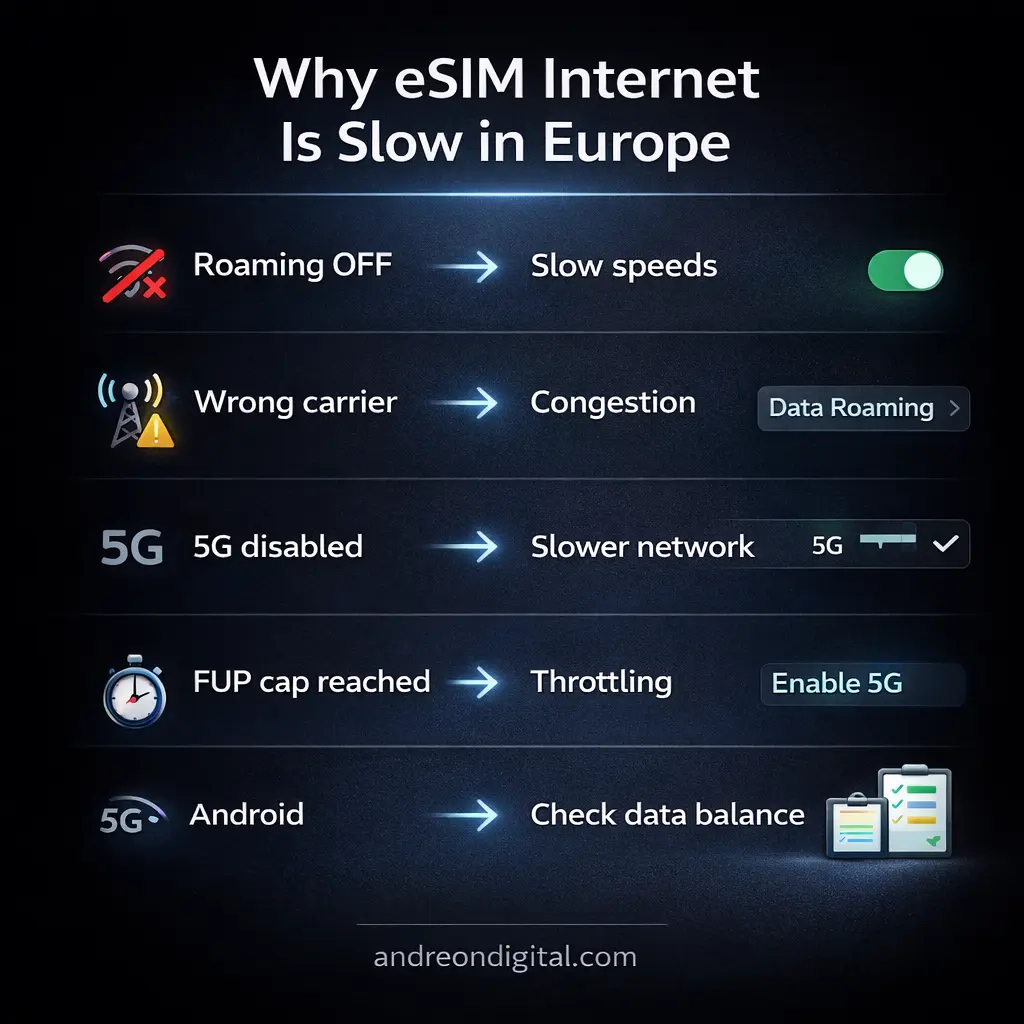
Why Your eSIM Internet Is Slow in Europe
Slow eSIM internet in Europe almost always traces back to one of five causes: a roaming setting that’s limiting your speed, an APN that wasn’t configured correctly, your phone connecting to the wrong carrier, 5G being disabled when it should be on, or your plan hitting its Fair Use Policy threshold. This guide goes through each one, in order of how commonly they’re the culprit.
If you’re experiencing slow eSIM internet in Europe, start with the fixes below in order.
Fix 1: Check Your Data Roaming Setting
Most common cause of unexpectedly slow speeds — especially on iPhone
This sounds counterintuitive: your eSIM is already connected and showing signal, so how can roaming be the issue? On iPhone specifically, Data Roaming being disabled doesn’t cut your connection entirely — it throttles it. You’ll see 1–2 signal bars and painfully slow data that technically works but feels broken.
iPhone:
- Settings → Mobile Data → tap your eSIM line name
- Check Data Roaming — toggle it ON if it isn’t
- Also check: Settings → Mobile Data → Mobile Data at the top → confirm your eSIM line is selected, not your physical SIM
Android:
- Settings → Connections → Mobile Networks
- Select your eSIM line
- Toggle Data Roaming ON
This is not your home carrier’s roaming — enabling this on a Nomad, Airalo, or Holafly eSIM costs nothing extra. It simply permits your phone to use foreign networks at full speed, which is exactly what a travel eSIM is designed to do.
After enabling: Toggle Airplane Mode on and off to force a network re-registration. Speed should immediately improve.
Fix 2: Check Your APN Settings
Cause of slow or capped speeds on Android; occasionally on iPhone
APN (Access Point Name) is the configuration that connects your phone to your provider’s data network. When it’s missing or incorrect, your phone may fall back to a slower default APN — giving you a connection that technically works but runs at a fraction of normal speed.
How to check on Android:
- Settings → Connections → Mobile Networks → Access Point Names
- Look for an entry from your eSIM provider (Nomad, Airalo, Holafly)
- If the entry is missing or shows a generic carrier default, it needs to be set manually
Correct APN values by provider:
| Provider | APN Name | APN Value | Username | Password |
|---|---|---|---|---|
| Nomad | Nomad | internet | (none) | (none) |
| Airalo | Auto-configured | Check in-app | — | — |
| Holafly | Auto-configured | Check support page | — | — |
If Airalo or Holafly APN isn’t auto-configured, open the provider app → support → search “APN” for your specific country’s values.
iPhone note: APN settings on iPhone are locked within eSIM profiles and cannot be manually edited. If you suspect an APN issue on iPhone, the fix is to delete and reinstall the eSIM profile — see eSIM Not Working in Europe? 9 Fixes for instructions.
Fix 3: Try Manual Carrier Selection
Cause of slow speeds when your phone locks onto a weak or incompatible carrier
Automatic carrier selection picks the strongest signal — but signal strength and data speed aren’t the same thing. Your phone may latch onto a carrier with excellent signal coverage but limited data capacity at that moment, while a faster carrier is available nearby.
This happens more in Europe than people expect, especially in tourist-heavy areas (city centres, airports, ski resorts) where carrier networks get congested at peak times.
Find your eSIM’s supported carriers first: Check your provider confirmation email or app — it lists which carriers your eSIM accesses in each country. For example, Nomad in Austria uses A1 + Telemach; Holafly in France uses Orange France.
iPhone:
- Settings → Mobile Data → [your eSIM line] → Network Selection
- Toggle Automatic OFF
- Wait for the network scan (30–60 seconds)
- Select a different carrier from the list
- Test speed — if faster, leave it; if not, try another or switch back to Automatic
Android:
- Settings → Connections → Mobile Networks → Network Operators
- Search networks → try selecting a different carrier manually
When this matters most: Airports on arrival, city centre tourist areas in peak season, ski resort base stations at lunch hour. These are the highest-congestion points in European mobile networks.
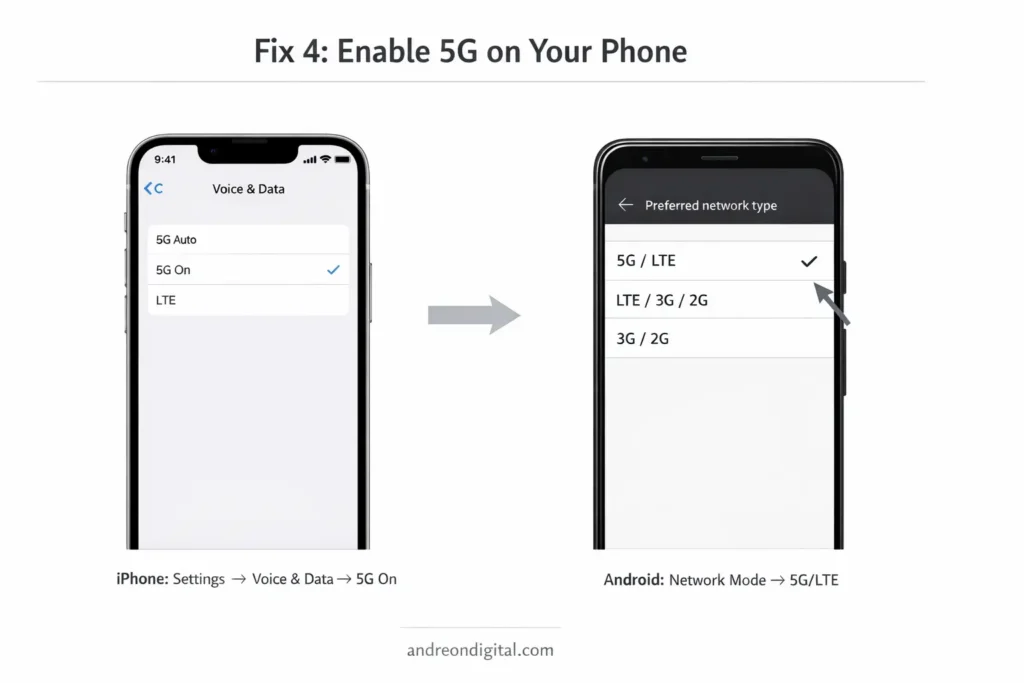
Fix 4: Check Your 5G Settings
Cause of slow speeds when your phone is on 4G in a 5G area
Another common reason for slow eSIM internet in Europe is having 5G disabled on your device — your plan supports it, but your phone is running on 4G without you realising it.
Most eSIM plans from Nomad, Airalo, and Holafly include 5G where available. But 5G has to be enabled on your phone — and some phones ship with it disabled to save battery, or it gets toggled off during international travel.
iPhone:
- Settings → Mobile Data → [your eSIM line] → Voice & Data
- Select 5G On or 5G Auto (5G Auto switches between 4G and 5G automatically to balance speed and battery)
Android (Samsung):
- Settings → Connections → Mobile Networks → Network Mode
- Select 5G/LTE/3G/2G (auto connect)
Android (Pixel):
- Settings → Network & Internet → SIMs → [your eSIM]
- Preferred network type → 5G
Where 5G actually matters in Europe: Major city centres (Vienna, Amsterdam, Paris, London, Berlin), airports, and main tourist districts. Rural areas, islands, and mountain terrain typically run on 4G regardless of your setting. Enabling 5G in a 4G area costs nothing — it simply means your phone will use 5G when the signal is available.
5G not available on your plan? Some budget eSIM plans are 4G only — this is usually stated on the plan page. Airalo Netherlands, for example, is 4G only as of early 2026. If 5G matters to you, verify before purchasing.
After switching to 5G, run a quick Speedtest to confirm the improvement — it takes 30 seconds and removes any doubt about whether the change worked.
Fix 5: FUP Throttling — Your Plan May Have Hit Its Limit
Cause of sudden speed drop mid-trip, usually after a data-heavy day
FUP stands for Fair Use Policy. Every “unlimited” eSIM plan has one — and hitting it is the most common reason for a sudden, dramatic speed drop mid-trip that has nothing to do with settings or carriers.
How FUP throttling works by provider:
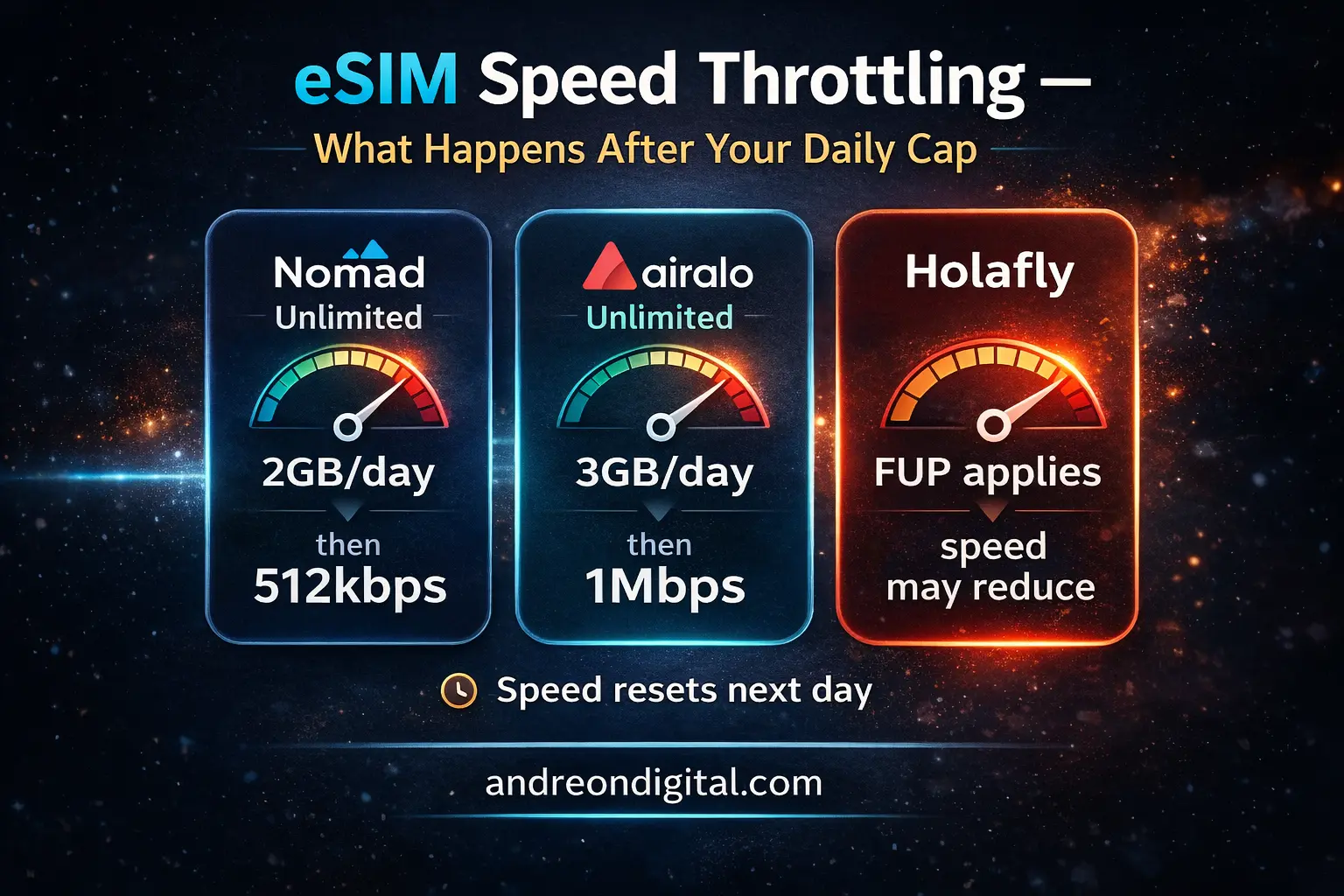
Nomad “Unlimited” plans: Not truly unlimited. Nomad’s unlimited plans include a daily high-speed cap — typically 2GB/day — after which speed drops to 512kbps. This is enough for messaging and maps, but not streaming or heavy browsing. Speed resets the following day.
Holafly unlimited plans: Holafly uses a Fair Use Policy with a monthly threshold. Some users report speed reduction after sustained heavy usage in a single day — consistent with Holafly’s FUP. Speed typically recovers after a period of lower usage or the following day.
Airalo “Unlimited” plans: Airalo’s unlimited plans for most European countries cap high-speed data at 3GB/day, after which speed drops to 1Mbps. Not truly unlimited.
How to check if FUP is your issue:
- Nomad app → My eSIMs → Usage — shows daily high-speed data remaining
- Airalo app → My eSIMs → Data Balance
- Holafly app → Active Plans
If FUP is the cause: The honest answer is to wait until the next day for speed to reset, reduce usage for the rest of the day, or purchase a fixed-data plan (Nomad 20GB/30d for $20 is better value than an “unlimited” plan for heavy users).
The broader point: For most travelers, a 20GB fixed-data plan is more predictable than an “unlimited” plan with FUP throttling. Unlimited sounds better — but consistent 5G speeds on a fixed plan often outperform throttled “unlimited” after the daily cap.
If your slow eSIM internet in Europe is caused by FUP throttling, switching to a high-data fixed plan is often the simplest solution. Nomad’s 20GB for $20 gives full 5G speeds for the entire plan — no daily cap, no throttling mid-trip.
Most cases of slow eSIM internet in Europe are solved by the fixes above — usually Data Roaming, carrier selection, or 5G settings.
FAQ
Why is my eSIM so slow in Europe even though I have signal?
The most common reasons: Data Roaming is disabled and throttling your speed (Fix 1), your phone connected to the wrong carrier automatically (Fix 3), or your plan has hit its daily FUP cap (Fix 5). Check Data Roaming first — it’s the fix that solves slow eSIM internet in Europe most often.
Does 5G make a real difference for travel eSIMs?
In major European cities — yes, noticeably. 5G speeds in Vienna, Amsterdam, Paris, and London regularly hit 200–600 Mbps on A1, KPN, Orange, and EE networks. 4G in the same areas typically runs 20–80 Mbps. For basic travel use (maps, messaging, browsing), 4G is sufficient. For video calls, hotspot use, or uploading content, 5G makes a meaningful difference.
My eSIM was fast yesterday and slow today — what changed?
Almost certainly FUP throttling (Fix 5). If you had a data-heavy day — navigation, video calls, hotspot use — you likely hit your plan’s daily high-speed cap. Nomad unlimited throttles after 2GB/day, Airalo after 3GB/day. Check your data balance in the provider app. Speed resets the following day.
Can I get full 5G speed on a travel eSIM?
Yes — if your plan includes 5G (most Nomad, Holafly, and Airalo European plans do), your phone supports 5G, and you’re in a 5G coverage area. Enable 5G in your phone settings (Fix 4) and ensure you’re connected to a 5G-capable carrier. In major European cities, full 5G speeds are routinely achievable on travel eSIMs.
Is slow eSIM speed always fixable without buying a new plan?
Usually yes — Fixes 1 through 4 are all free settings adjustments. Fix 5 (FUP throttling) requires either waiting for the speed to reset or switching to a fixed-data plan. If none of the fixes work and your plan isn’t throttled, contact your provider’s support — slow speed due to a network issue on the provider’s end is rare but possible, and they can investigate.
Which eSIM provider has the fastest speeds in Europe?
Speed depends more on which carrier your eSIM uses than the provider itself. Nomad on A1 Austria or Deutsche Telekom Germany, Holafly on Orange France, and Airalo on EE UK consistently deliver fast speeds because they use strong local carriers. The key is knowing which carrier your eSIM accesses in each country — check the provider’s plan page before purchasing.
Final Verdict
In most cases, slow eSIM internet in Europe isn’t a network problem at all. It’s usually a simple phone setting — Data Roaming turned off, the wrong carrier selected, or 5G disabled.
Start with the fixes above before assuming your eSIM provider is the issue. Most travelers solve slow eSIM speeds in just a few minutes by adjusting one of these settings.
If your speed drop turns out to be caused by Fair Use Policy throttling, switching to a higher-data plan is often the easiest long-term solution for consistent travel connectivity.
Keep Reading
eSIM Troubleshooting
- eSIM Not Working in Europe? 9 Fixes That Actually Solve It
- How to Activate eSIM for Europe: Step-by-Step
- eSIM Compatible Phones 2026: Full List
eSIM Plans
- Best eSIM for Europe 2026: 7 providers compared
- Can I Use One eSIM in Multiple European Countries?
- Does 5G Matter for Travel eSIMs in Europe?
- Slow signal on trains? See Best eSIM for Train Travel in Europe — 4G lock tip
eSIM by Country
- Portugal | Spain | Italy | France| Germany | Greece | Netherlands | UK
- Croatia | Turkey | Austria | Switzerland | Czech Republic