
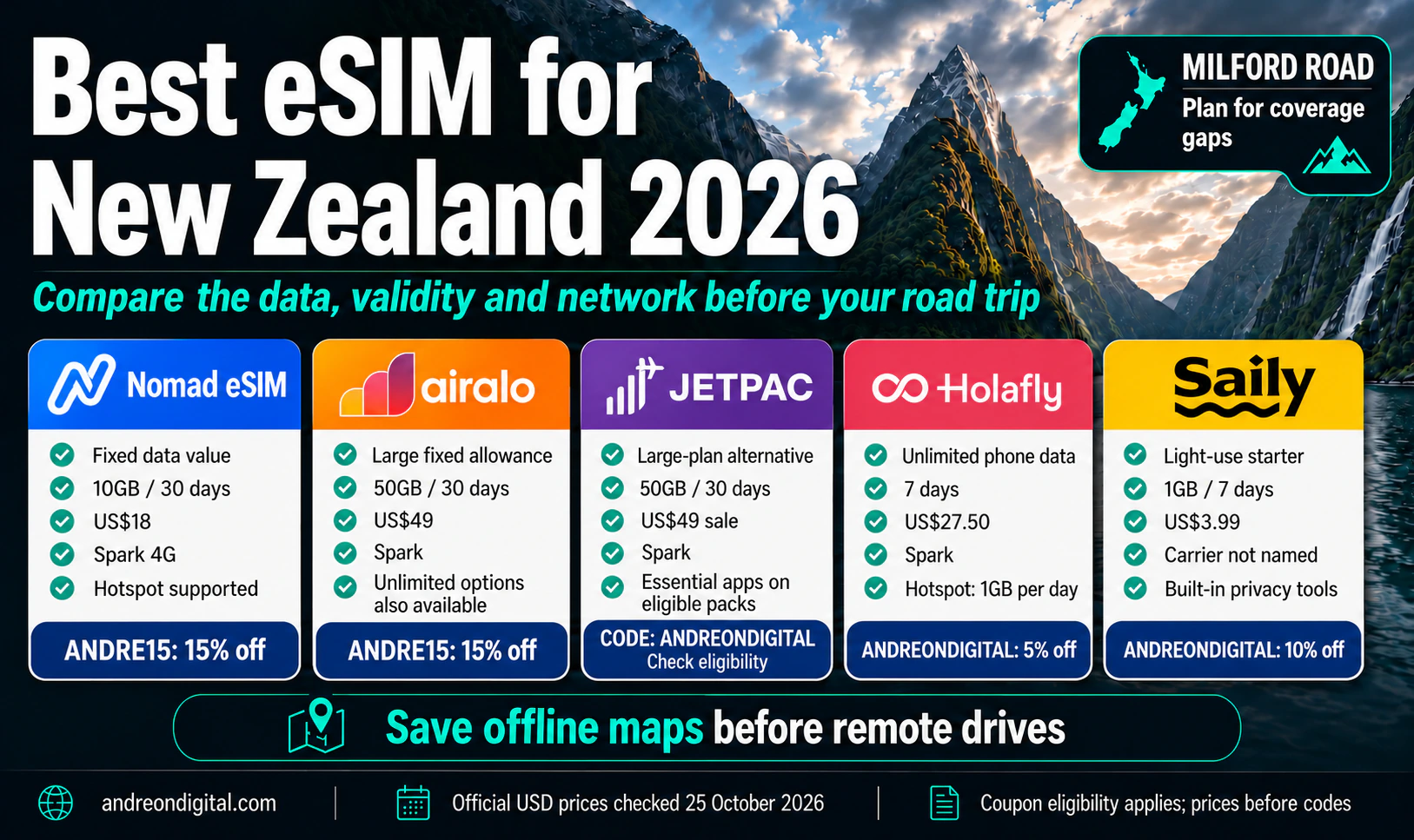
For a New Zealand road trip, I would start with Nomad eSIM’s 10GB / 30-day plan at US$18, or 20GB at US$28 if I expected more uploads and sharing. Airalo and Jetpac both offer 50GB / 30-day options at US$49 in the current comparison. Holafly suits travelers who prefer to buy unlimited phone data by the day, while Saily’s US$3.99 starter is worth a look for light use.
The part I would settle before buying is the route. A few days in Auckland and Queenstown are different from a campervan trip with remote stops. Coverage can disappear between towns, and buying more data does not change that. At the same time, it would be wrong to say that every phone is offline throughout Fiordland: the Department of Conservation now lists reception at several Milford Road stops.
Continuing beyond New Zealand? Compare Australia, Oceania regional plans and international eSIM options against your full itinerary.
The quick decision
- Moderate fixed-data use: Nomad eSIM, US$18 for 10GB or US$28 for 20GB, both valid for 30 days.
- A larger fixed allowance: compare Airalo and Jetpac at US$49 for 50GB / 30 days. Jetpac’s amount is a displayed sale price.
- Unlimited phone data for a week: Nomad eSIM is US$25 with 2GB/day before slowing; Airalo is US$27 with 3GB/day before slowing; Holafly is US$27.50 with fair use and 1GB/day of hotspot.
- A small backup plan: Saily is US$3.99 for 1GB / 7 days. That allowance can disappear quickly if photo backup or video is enabled.
- Milford Road: save maps and bookings before the drive, even though some stops have reception.
Install your New Zealand eSIM before the flight
Check the exact phone model and market version, not just the model family. It needs eSIM support and must be unlocked for another provider. Install using reliable Wi-Fi, keep the instructions accessible and read when the chosen package starts its validity. Installation and activation are not always the same event.
Choose the travel eSIM for mobile data when you arrive. Keep data roaming off on your home line if you do not want to use its roaming service, and disable automatic data switching to avoid fallback. Calls, texts and voicemail on the home line can still generate charges, so check those separately. Keeping your number available is useful only if the costs and phone settings suit you.
The eSIM activation guide explains the general phone settings. Its examples are for Europe, so use your New Zealand provider instructions for the APN, roaming and activation policy. If something fails after arrival, the eSIM troubleshooting guide can help with the basic checks.
Check older or imported phones carefully. Spark confirms its 3G network closed on 31 March 2026. Confirm 4G/5G data compatibility and, if you need voice service, the carrier and device requirements for calls including emergency calls. An eSIM-compatible label alone does not answer every network-compatibility question.
New Zealand networks: what the package actually confirms
Spark, One NZ and 2degrees operate New Zealand mobile networks. That does not mean every travel eSIM can use all three. For the plans checked here, Nomad eSIM, Airalo, Jetpac and Holafly name Spark. Saily’s public country page does not identify its New Zealand carrier, so I would ask before buying for a route where that information matters.
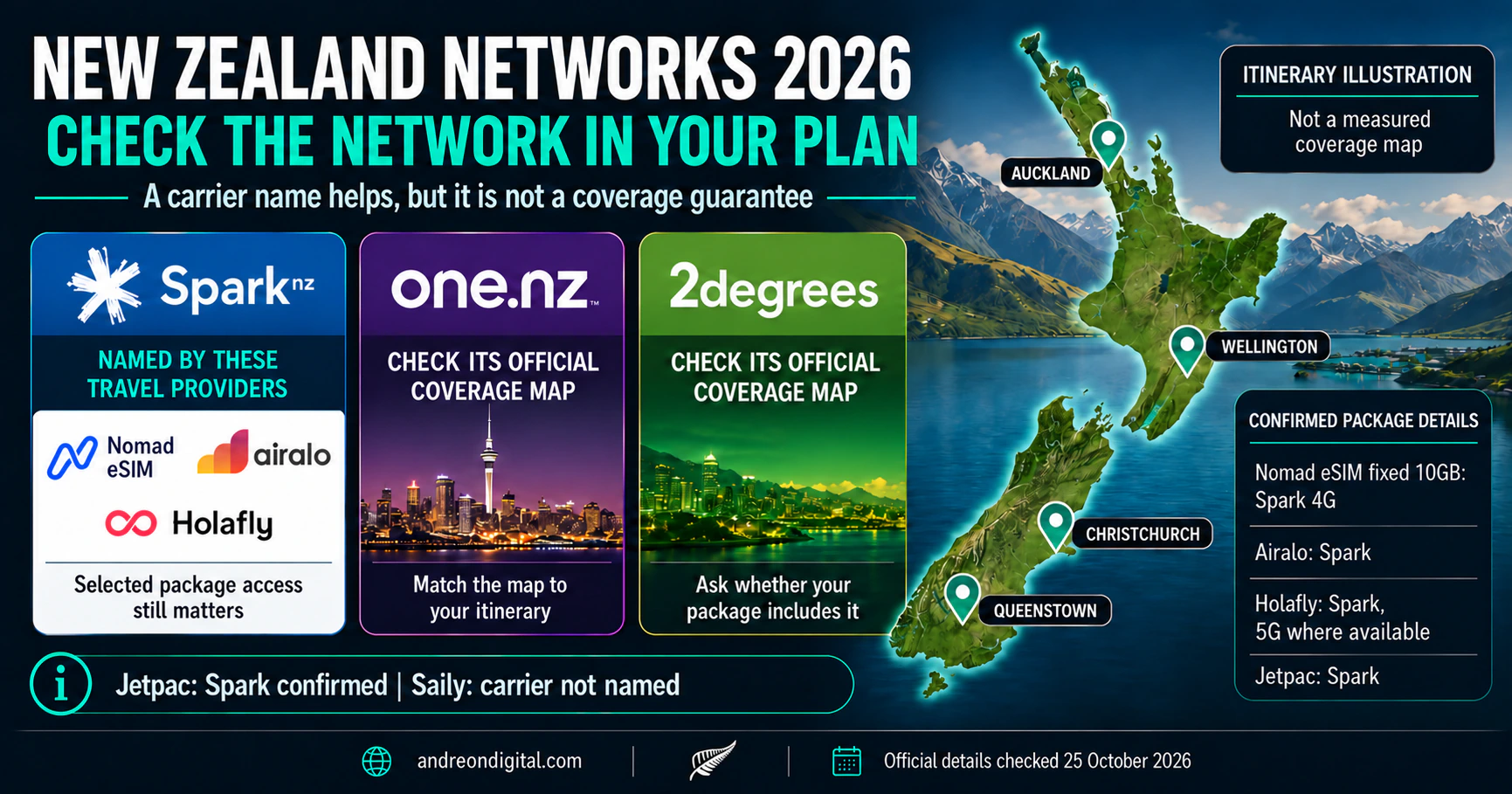
| Provider | Official network disclosure | Practical detail |
|---|---|---|
| Nomad eSIM | Spark | Selected 10GB fixed plan: 4G. Selected seven-day unlimited: 2GB/day at 4G/5G, then 1Mbps. |
| Airalo | Spark | Data-only packages with fixed and unlimited options. Device and local access affect the connection. |
| Holafly | Spark | 5G where available, plus 4G/LTE; 1GB/day hotspot. |
| Jetpac | Spark | The New Zealand network drawer names Spark; check the selected pack and route. |
| Saily | Not named on the country page | Hotspot allowed; no named-carrier guarantee. |
Use the official coverage information for the actual network: Spark, One NZ and 2degrees. A population-coverage figure is not a promise of reception along every road or trail. Terrain, indoor reception, congestion, the phone and the roaming arrangement can all change the result. For itinerary ideas, see Tourism New Zealand.
Milford Road and Fiordland: limited reception, with named stops
The 120km Milford Road has limited mobile reception. DOC says fibre has been installed along the route and lists reception at Te Anau Downs, Totara Campsite, The Divide and Milford Sound.
That is useful progress, but it does not make continuous mobile navigation a sensible assumption. Save the route, accommodation details, tickets and any campsite booking before leaving a reliable connection. Check which network your package uses and leave room for gaps between stops.
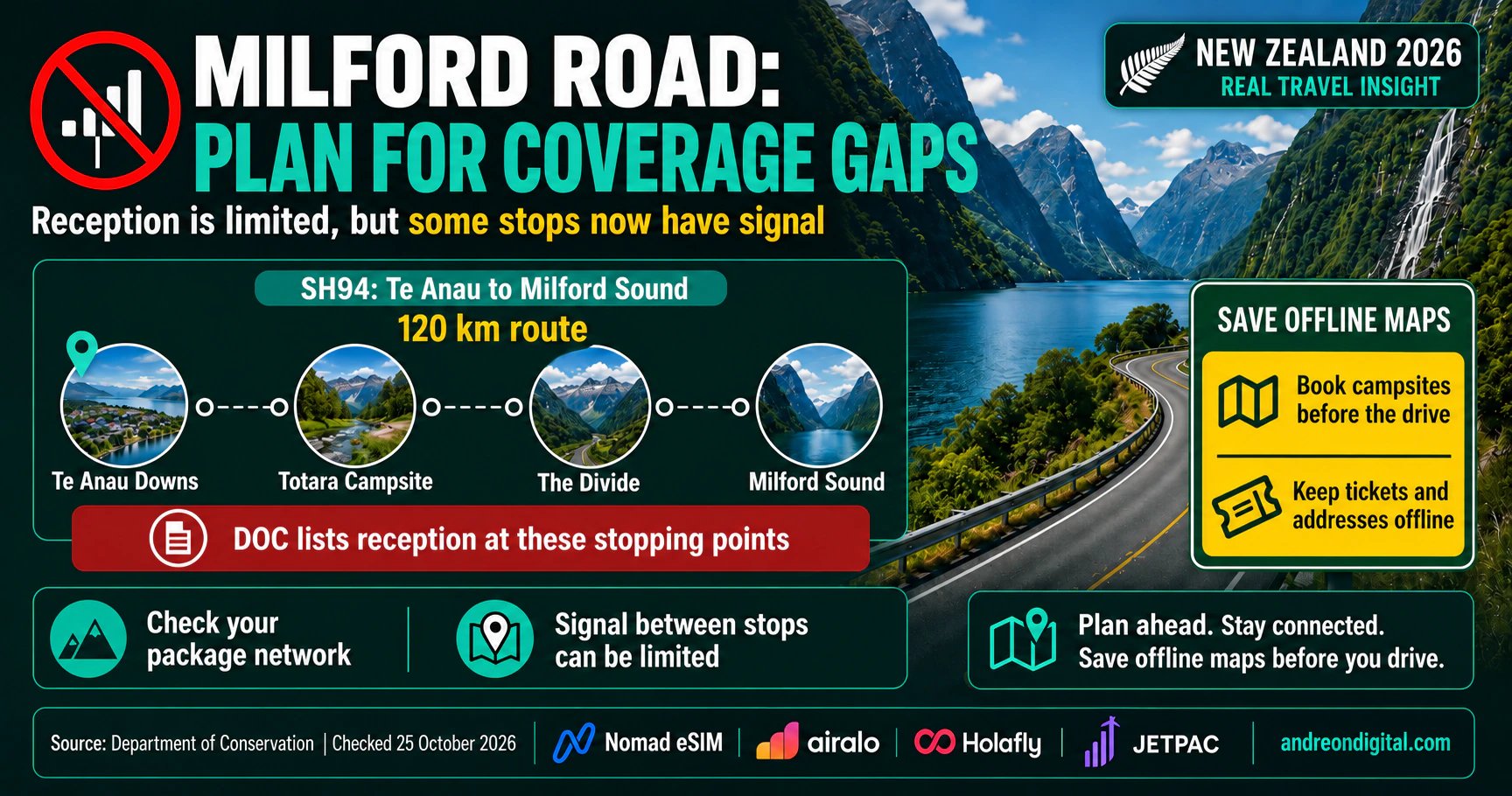
DOC’s current Milford Road guidance is the source for those stopping points. It does not guarantee that every roaming package or every phone will connect at each one. For remote walks, follow DOC trip-planning advice instead of treating a mobile-data plan as the whole communication plan.
New Zealand eSIM prices: fixed data and unlimited compared
These are prices for the specified allowance and duration. A 7-day package and a 30-day package are different purchases even when both say 10GB. I would first choose the validity that covers the trip, then compare the amount of data and sharing rules.
Nomad eSIM
| Fixed data | Validity | USD price |
|---|---|---|
| 1GB | 7 days | US$4.50 |
| 3GB | 30 days | US$9 |
| 5GB | 30 days | US$13 |
| 10GB | 30 days | US$18 |
| 20GB | 30 days | US$28 |
| Unlimited validity | USD price |
|---|---|
| 3 days | US$11 |
| 5 days | US$18 |
| 7 days | US$25 |
| 10 days | US$33 |
The selected 10GB fixed package names Spark 4G and permits hotspot. The seven-day unlimited package names Spark and provides 2GB/day at 4G/5G, then 1Mbps. It also allows hotspot, but has no add-on and is listed as non-refundable. Those are different conditions from the fixed package, not simply a larger allowance.
Airalo
| Fixed data | Validity | USD price |
|---|---|---|
| 1GB | 3 days | US$4 |
| 3GB | 3 days | US$9 |
| 3GB | 7 days | US$10 |
| 5GB | 7 days | US$13 |
| 10GB | 7 days | US$23 |
| 5GB | 15 days | US$13.50 |
| 10GB | 15 days | US$23.50 |
| 20GB | 15 days | US$37 |
| 5GB | 30 days | US$14 |
| 10GB | 30 days | US$24 |
| 20GB | 30 days | US$38 |
| 50GB | 30 days | US$49 |
| Unlimited validity | USD price |
|---|---|
| 3 days | US$11.50 |
| 5 days | US$18.50 |
| 7 days | US$27 |
| 10 days | US$34.50 |
| 15 days | US$48 |
| 30 days | US$71 |
The New Zealand unlimited package records specify 3GB/day before speed reduces to 1Mbps. Fixed plans provide one total allowance for their validity period. For example, US$49 buys a 50GB bucket for 30 days, which can be more useful than a daily allowance if your uploads are uneven.
Jetpac
| Plan | Validity | USD price |
|---|---|---|
| 50GB fixed data | 30 days | US$49 sale |
| Unlimited | 30 days | US$66 sale |
These are the selected offers verified on Jetpac’s current New Zealand page. Its unlimited rule is 3GB every 24 hours at standard network speeds, then up to 1Mbps until the next cycle. Both the sale and any reader-code eligibility should be checked at checkout. Choose for the data allowance and listed benefits, and read any add-on conditions separately.
Holafly
| Unlimited validity | USD price |
|---|---|
| 3 days | US$11.90 |
| 5 days | US$20.50 |
| 7 days | US$27.50 |
| 10 days | US$37.50 |
| 15 days | US$51.50 |
| 30 days | US$76.50 |
Holafly names Spark and allows 1GB/day of hotspot sharing. Its unlimited phone data is subject to fair-use conditions, so the sharing allowance matters if you plan to work from a laptop. The longer plans have different daily averages; do not multiply the one-day headline price to estimate a month.
Saily
| Fixed data | Validity | USD price |
|---|---|---|
| 1GB | 7 days | US$3.99 |
| 3GB | 30 days | US$9.99 |
| 5GB | 30 days | US$13.99 |
| 10GB | 30 days | US$23.99 |
| 20GB | 30 days | US$37.99 |
Saily also sells unlimited options. Select the required duration and check the daily high-speed allowance before paying; its help centre explains that speed drops to about 1Mbps once the daily allowance is used. The fixed plans above have no separate hotspot cap, but shared traffic still uses the purchased allowance. The country page does not name its local carrier.
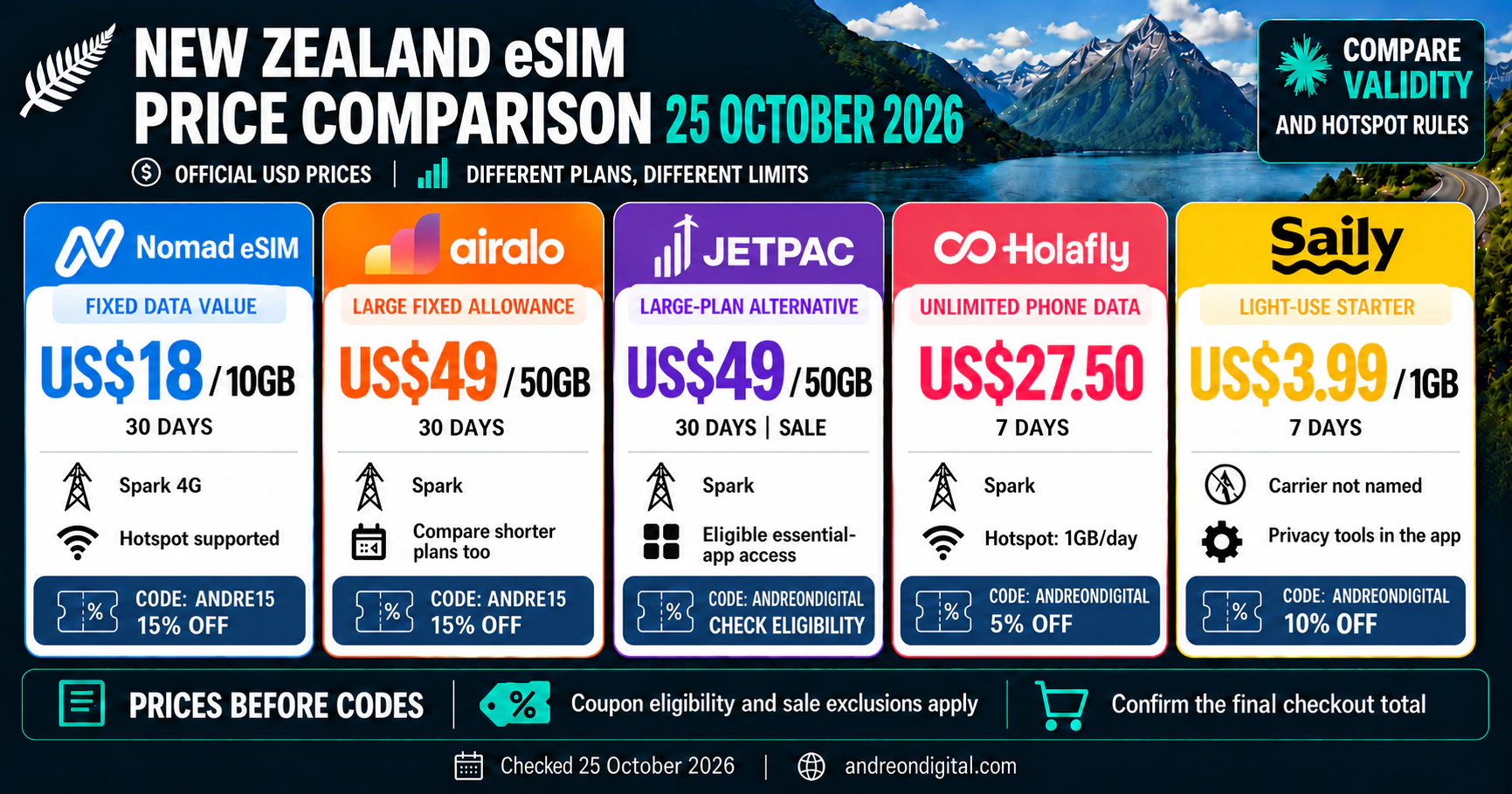
Reader codes: ANDRE15 gives 15% with Nomad eSIM and Airalo on eligible purchases. ANDREONDIGITAL gives 10% with Saily and 5% with Holafly on eligible purchases. For Jetpac, enter ANDREONDIGITAL and check the discount offered for the selected package. Sale exclusions and other limits may apply. Compare the final checkout total; do not assume a code stacks with an automatic discount.
The five providers: what would make me choose each one?
Nomad eSIM
If I expected to use between 5GB and 20GB over a holiday, Nomad eSIM would be my first comparison here. The 10GB / 30-day price is US$18, against US$24 for Airalo and US$23.99 for Saily at that allowance and validity. At 20GB, Nomad eSIM costs US$28. That leaves more of the budget for the trip when a fixed allowance fits your usage.
The US$25 seven-day unlimited plan could suit steady daily use, but its 2GB daily high-speed threshold is important. A video upload that consumes several gigabytes at once may fit a fixed bucket better. Both selected plans permit hotspot; the unlimited package does not provide unlimited high-speed sharing.
I have used Nomad eSIM in Portugal. My Nomad eSIM review covers that experience. For this trip I would install before departure and remember that the package starts on a supported network or automatically after 60 days, even if I have not used it. Continuing to Australia requires an appropriate separate or regional package.
Nomad eSIM setup video
This video shows the Nomad eSIM setup process. Use your order instructions for activation, then select the travel line for mobile data and enable its roaming when required. The video is not a New Zealand coverage test.
Airalo
Airalo is useful if you want more choice in the length of a fixed plan, or a 50GB allowance for a month. Its 50GB / 30-day option is US$49, the same headline price as Jetpac’s displayed sale offer. Compare the package conditions before deciding between the two.
I would compare the longer validity before choosing a shorter package. Airalo’s 5GB is US$13 for seven days, US$13.50 for 15 days or US$14 for 30 days. The extra dollar can buy more flexibility if your dates might change. That does not mean buying more data than you need: choose the allowance separately.
I have used Airalo in Figueira da Foz, Portugal, as described in the Airalo review. The current New Zealand package names Spark. For a trip across the Tasman, compare the country plan against the Oceania options and confirm both countries appear in the package list.
Airalo setup video
The Airalo video is a setup reference. Check the validity and activation policy for your selected package, and review available top-ups in the app. A setup walkthrough does not establish current prices or reception at your destination.
Jetpac
Jetpac deserves a comparison for its 50GB / 30-day sale offer at US$49. Its New Zealand network drawer names Spark. That gives me a carrier map to check against the route, although it does not promise reception at every campsite or viewpoint.
The useful extra is access to WhatsApp chat, Uber, Grab and Google Maps navigation on eligible packs of 3GB or more after the data runs out. It is not a replacement for downloading maps, since those apps still need a supported connection. The page also advertises SmartDelay lounge access, which requires registration and a qualifying delay.
Jetpac’s help page says to register at least 24 hours before departure and allows up to two flights per purchased data pack plus one companion. Lounge access remains conditional; it is not an unconditional free airport lounge with every purchase. I have not personally tested Jetpac. See the Jetpac eSIM review for more on the service.
Jetpac setup video
Use this Jetpac video to see the installation flow. Review the current pack conditions and register any eligible flight benefit in advance. Voice packs are separate from the data-only package; the data price does not include a New Zealand phone number.
Holafly
Holafly’s seven-day New Zealand plan costs US$27.50 and names Spark. The reason I would consider it is the convenience of selecting the number of days rather than a fixed data bucket. I would still read the fair-use policy and plan my laptop use around its 1GB daily hotspot allowance.
For a longer stay, 15 days costs US$51.50 and 30 days costs US$76.50. That is a noticeable step above a fixed allowance, so I would check my recent usage before paying for it. Unlimited can be convenient for frequent phone use, but it is not automatically the best purchase for maps and messages.
I have used Holafly in Portugal, Turkey and Thailand. My Holafly review describes those trips. I have not tested its New Zealand reception. If your trip is a month, the general planning ideas in the 30-day Europe eSIM guide can help you think about validity and data use, but use the New Zealand prices here.
Holafly setup video
The Holafly video explains setup. Install with a reliable connection and follow the order instructions for starting the plan on arrival. The current New Zealand sharing limit is 1GB/day, regardless of older examples in a video.
Saily
Saily’s 1GB / 7-day plan at US$3.99 can work as a small arrival or backup allowance. For a full trip, I would compare the 5GB / 30-day option at US$13.99 with Nomad eSIM at US$13 and Airalo at US$14. The differences at that size are small enough that your preferred app and package terms may decide it.
Its Virtual Location, web protection and ad blocker are built into Saily. The data plan does not include a separate NordVPN subscription; check the scope of those features before relying on them for public Wi-Fi. Its local carrier is not named on the country page.
I have not personally tested Saily; the Saily eSIM review explains the service in more detail. Its country page gives a 180-day activation window and permits hotspot sharing. A separately purchased US number and calling or messaging plan are different products, not a local New Zealand number bundled with these fixed-data plans.
Saily setup video
This walkthrough shows the Saily app setup. Read the activation window, turn on the travel line and follow its roaming instructions. Check the selected unlimited plan separately if you choose one, since its daily speed policy differs from a fixed allowance.
Coverage planning for the North and South Islands
One New Zealand country package covers travel on both main islands, subject to the selected network’s coverage. I would check the actual accommodation addresses, roads and walks before buying, especially for a campervan itinerary. A town name on a country page tells you less than a route checked against the network map.
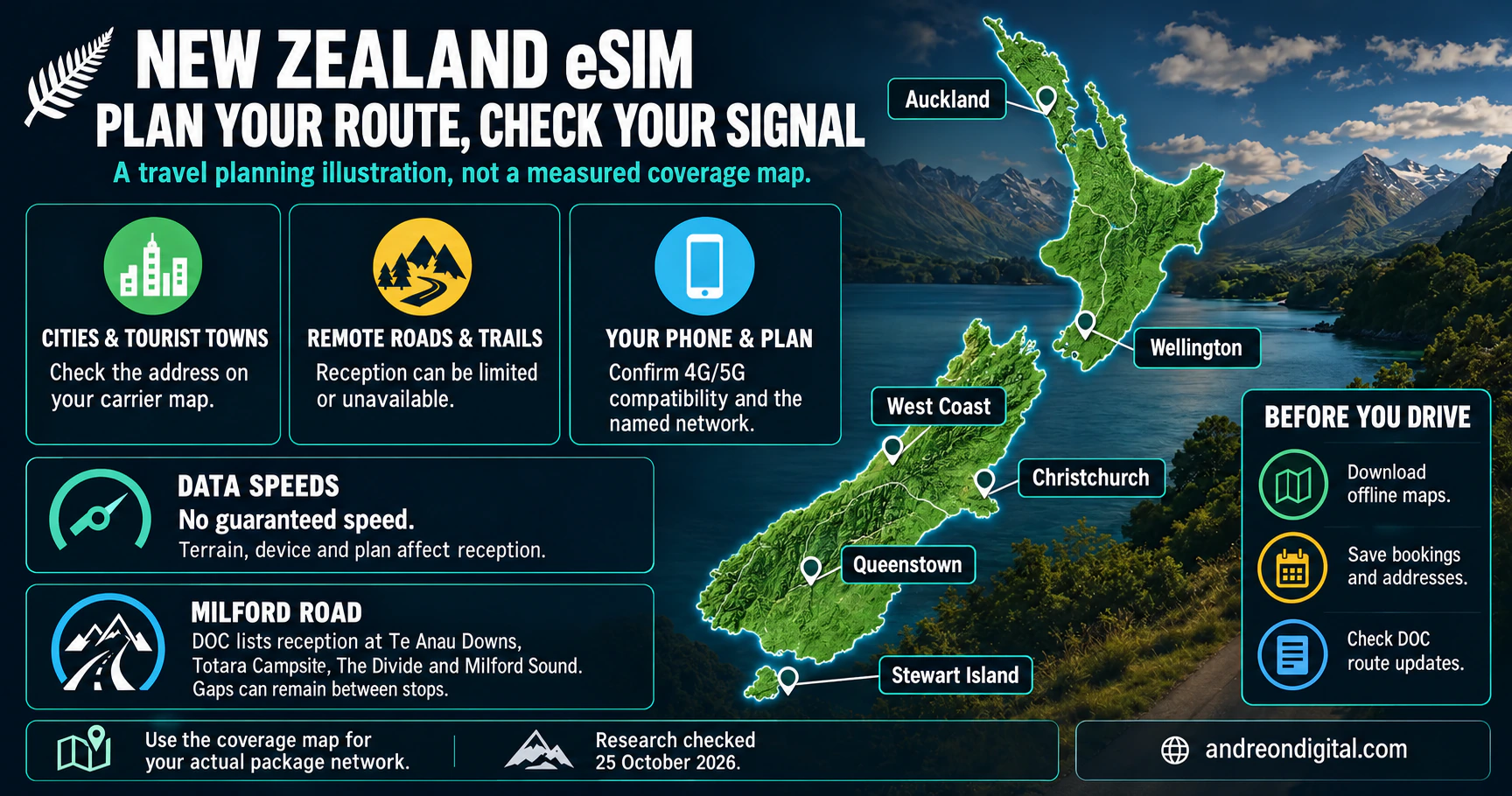
| Route or area | What I would prepare |
|---|---|
| Auckland, Wellington and Christchurch | Check accommodation addresses and the selected network map, especially if indoor reception matters. |
| Queenstown, Rotorua, Wanaka and Taupo | Check the town and the drives or walks beyond it separately. A town label is not a trail-coverage promise. |
| Te Anau and Milford Road | Save the route and bookings. DOC lists selected reception stops, but gaps remain possible. |
| Fiordland, Southern Alps and Stewart Island trails | Prepare for limited or unavailable mobile service; follow DOC advice for the specific walk. |
| West Coast, Paparoa, Arthur’s Pass and Coromandel | Download routes and accommodation details before remote sections; check recent local information. |
| Cook Strait ferry | Do not rely on continuous land-based mobile reception throughout the crossing. |
Practical tips before you travel
- Use your own data history. Maps and messages with accommodation Wi-Fi need a different allowance from daily video uploads or laptop work. A 5GB plan may suit light use, while 10GB or 20GB gives more room. These are planning examples, not a promise that a certain amount lasts every trip.
- Download large files on Wi-Fi. Offline maps, playlists and saved tickets reduce the data needed on the road. Turn off mobile photo backup if you want to control usage.
- Check the sharing rule. Holafly’s 1GB/day hotspot, Nomad eSIM’s daily unlimited threshold and a fixed 50GB bucket are different products for a laptop user.
- Keep activation details available. Do not delete the profile as the first troubleshooting step. Check the data line, roaming and APN instructions, then contact the provider.
- Consider local service if calls matter. A local operator can offer a SIM or eSIM with a New Zealand number. Compare the complete offer rather than assuming the SIM format decides what is included.
Spark’s visitor guidance explains local connection options and device checks. For an onward Australia trip, compare a dedicated package with a regional offer before buying twice. A New Zealand-only plan does not automatically include Australia or nearby Pacific destinations.
FAQ: New Zealand eSIMs
What is the best eSIM for New Zealand in 2026?
Does an eSIM work at Milford Sound and in Fiordland?
Which networks do New Zealand travel eSIMs use?
How much data do I need for New Zealand?
Does one eSIM cover both the North and South Islands?
Can I use the same package in New Zealand and Australia?
Should I keep my home SIM active in New Zealand?
Are unlimited New Zealand eSIMs unlimited at full speed?
Final Verdict: what I would buy for a New Zealand trip
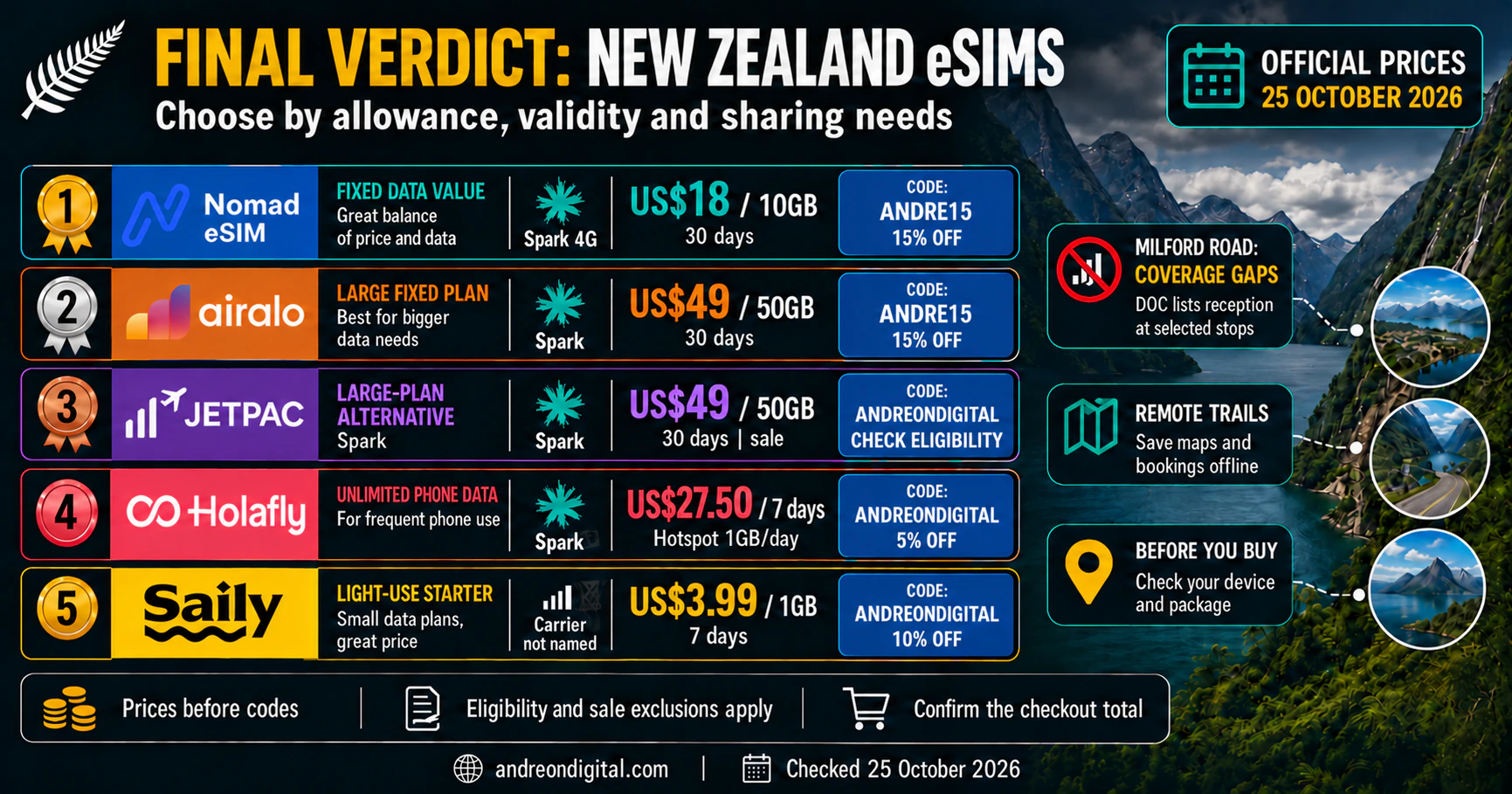
For a typical holiday with maps, messages and some uploads, my first choice to compare would be Nomad eSIM’s 10GB / 30-day plan at US$18. If I expected to share with a laptop or upload more often, I would consider the US$28 20GB plan instead. I have used the service in Portugal, so the familiar setup is a real consideration for me. It is not evidence that it performs best on a New Zealand road.
For 50GB, I would compare Airalo and Jetpac side by side. Both show US$49 for 30 days in this update. Both name Spark, so I would compare the validity, sharing rules and support options rather than assume a different local network. Jetpac’s essential-app benefit can be useful, but I would not let a lounge perk decide the purchase if the network or validity did not fit the trip.
For unlimited, I would decide how the data will be used before comparing prices. Nomad eSIM’s seven days at US$25 is the lowest of the three seven-day examples here, but its daily high-speed allowance is 2GB. Airalo costs US$27 with 3GB/day before slowing. Holafly is US$27.50 with 1GB/day of hotspot and fair-use conditions. For frequent phone use, Holafly may suit; for a laptop or large one-off upload, a fixed bucket can be easier to plan around.
Saily is worth considering when the app and its privacy tools suit you, or when a small starter is enough. Its US$3.99 1GB plan keeps the initial purchase small. At 10GB and 20GB, however, Nomad eSIM has lower listed prices in this comparison. I would pay the difference only if the features and terms were useful to me.
Whichever I bought, I would prepare the route in the same way. Check the network, save maps and bookings, and verify remote stops. DOC’s named reception points make the Milford Road advice more precise, but they do not remove the need to plan for gaps. The right package makes the connected parts of the trip easier; offline preparation covers the moments when it cannot.
This article contains affiliate links. I may earn a commission at no extra cost to you. Official prices and package information were checked on 25 October 2026. My personal use is limited to Nomad eSIM in Portugal, Holafly in Portugal, Turkey and Thailand, and Airalo in Figueira da Foz. I have not tested connectivity in New Zealand or used Jetpac or Saily. Prices, sales, coupon eligibility and network access can change.
Official sources: Nomad eSIM New Zealand · Airalo New Zealand · Jetpac New Zealand · Holafly New Zealand · Saily New Zealand · Saily unlimited policy · Jetpac SmartDelay conditions. Use the current selected-package terms when buying; older videos are setup references.