



Want to receive bank texts with a travel eSIM while you’re abroad? You land, try to pay for something or log in to your bank, and the verification code goes to your usual phone number. Will it still arrive when your internet comes from a different provider?
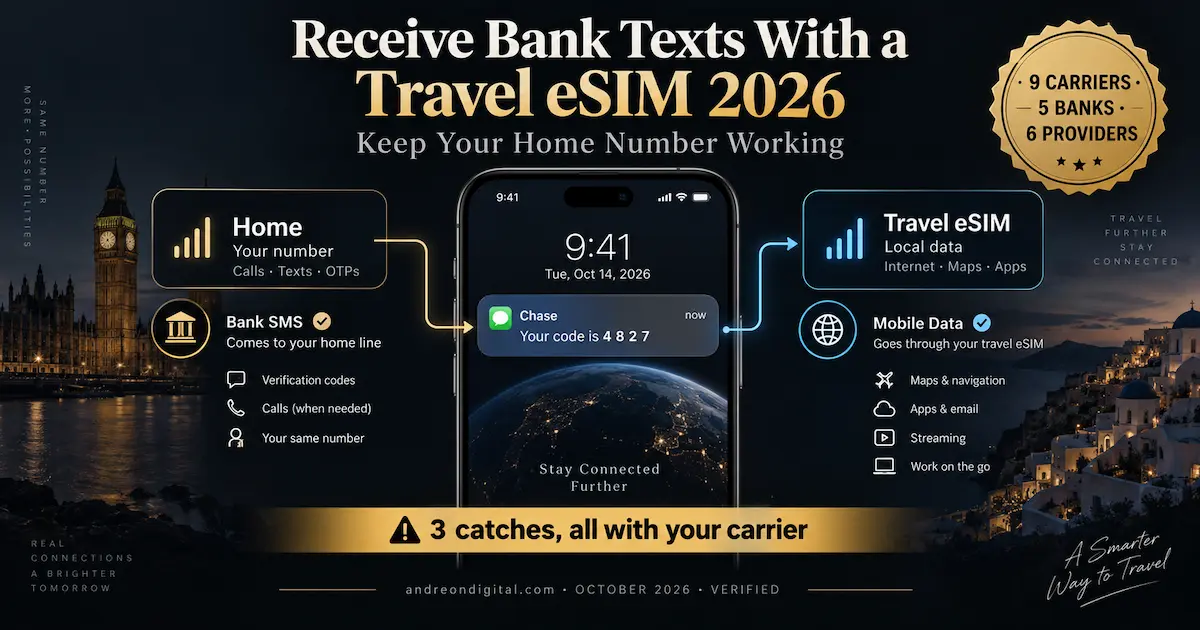
Usually, yes. A travel eSIM gives you data, and the code goes to your home number, which stays on the home SIM sitting right beside it in the same phone. Keep that line switched on and the code arrives the way it always does. That part every guide gets right.
What they leave out is that three rules decide whether it actually works, and all three live with your carrier rather than your eSIM. T-Mobile does not deliver short codes overseas at all, and many banks send codes from short codes. Receiving a text is not free everywhere, despite what you will read. And keeping your home line reachable means answering a call can start a $12 roaming charge on the two biggest American carriers.
⚡ The Short Answer
✅ Yes, your bank codes usually still arrive, on your home line, not on the eSIM
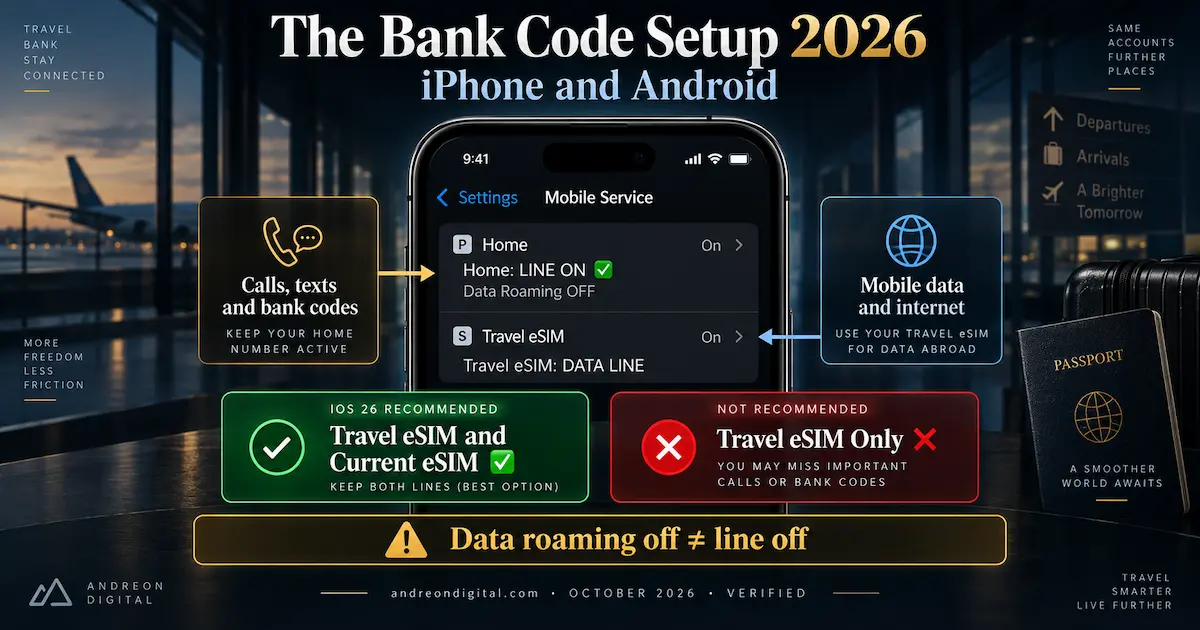
✅ The setup: home line on · its data roaming off · travel eSIM as the data line
❌ T-Mobile does not deliver short codes overseas, and its page publishes no Wi-Fi exception
💲 Receiving is not free everywhere: Verizon pay-as-you-go charges $0.05 a text
📞 Answering a call starts a $12 pass on AT&T and Verizon. Not on O2
⚠️ Data roaming off is not the same as line off. Only the second stops your codes
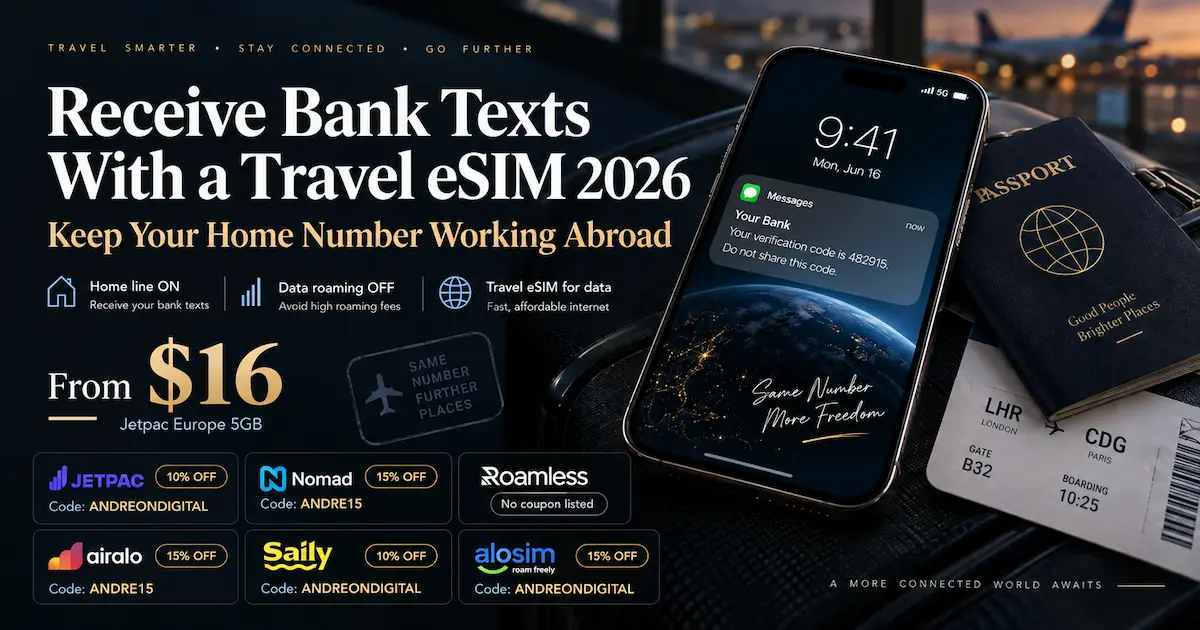
💶 Cheapest Europe data for this setup: Jetpac · $16 for 5GB · $22 for 10GB
🔐 Before you fly: set up your bank’s own alternative, a passkey, an app approval or a security key
Why the Code Goes to Your Home Line, Not the eSIM
To receive bank texts with a travel eSIM, think of the phone number and the data plan as two separate services. Your bank does not know or care that you bought a travel eSIM. It sends the code to the number on your account, and that number belongs to your home carrier. So the only question is whether that line can receive a text where you are, and there are three ways it can.
| Route | How the text reaches you | What it needs | How reliable |
|---|---|---|---|
| 📶 Cellular roaming | Your home line registers on a foreign network and the text arrives over it | Home line on, international roaming enabled on the account | ✅ The main route. Works without data roaming |
| 🌐 SMS over Wi-Fi Calling | Over a real Wi-Fi network, if your carrier allows it abroad | Wi-Fi Calling set up before you leave | ⚠️ Blocked abroad on O2, EE and TELUS |
| 🔀 Over the travel eSIM’s data | Your home line uses the other SIM’s data connection | Specific device and carrier support | ⚠️ Not confirmed by any carrier we audited. A bonus, not a plan |
| ❌ Home line switched off | It does not. That route is gone on this phone | — | ❌ The most common reason codes stop |
| ❌ A new number from an app | To a different number your bank does not know | — | ❌ Not your bank’s number at all |
| ❌ Call forwarding | Verizon confirms call forwarding does not forward texts | — | ❌ Calls only |
Nine Carriers: Receiving a Text Abroad, and What Costs Money
These findings come from each carrier’s published policy, reviewed on 7 October 2026. Whether you can receive bank texts with a travel eSIM depends on your home carrier’s SMS rules, not on the travel data package. Receiving, sending, answering a call and using data are different triggers, and carriers treat them differently.
| Carrier | Receiving a text abroad | What starts a charge | Texts over Wi-Fi abroad | Short codes |
|---|---|---|---|---|
| 🇺🇸 Verizon | Not a TravelPass trigger · ⚠️ $0.05 per received text on pay-as-you-go | ⚠️ Making or answering a call, sending a text, data including background | ✅ Allowed, free to and from US numbers on unlimited | Not published |
| 🇺🇸 AT&T | ✅ Domestic rate, no Day Pass charge | ⚠️ Calls, sent texts, data | ✅ Treated as regular texts · 13 countries blocked | Not published |
| 🇺🇸 T-Mobile | ✅ Included in 215+ destinations on eligible plans | International Pass is bought separately · ⚠️ an unanswered call to voicemail can cost a minute | ✅ Received free on unlimited plans | ❌ Not delivered overseas |
| 🇨🇦 Rogers | ✅ Not charged | Sending, calls made or answered, data | ✅ Received from any country, included | Not published |
| 🇨🇦 TELUS | ✅ Plain texts free, no Easy Roam trigger | Data, sent texts, calls, checking voicemail | ❌ Prohibited outside Canada | Premium texts excluded |
| 🇬🇧 O2 | ✅ No O2 Travel trigger | ✅ Receiving a call does not trigger it either | ❌ Not supported outside the UK | Not published |
| ⚠️ 🇬🇧 EE consumer | ⚠️ Not confirmed. We are not publishing zero | Varies by plan and destination | ❌ UK only | Not published |
| 🇲🇽 Telcel | ✅ Free, per its official glossary | Not defined by that source | Not published | Not published |
| 🇧🇷 Vivo | ✅ Free, per its FAQ | Daily charge by internet, voice or sent text use | Not published | Not published |
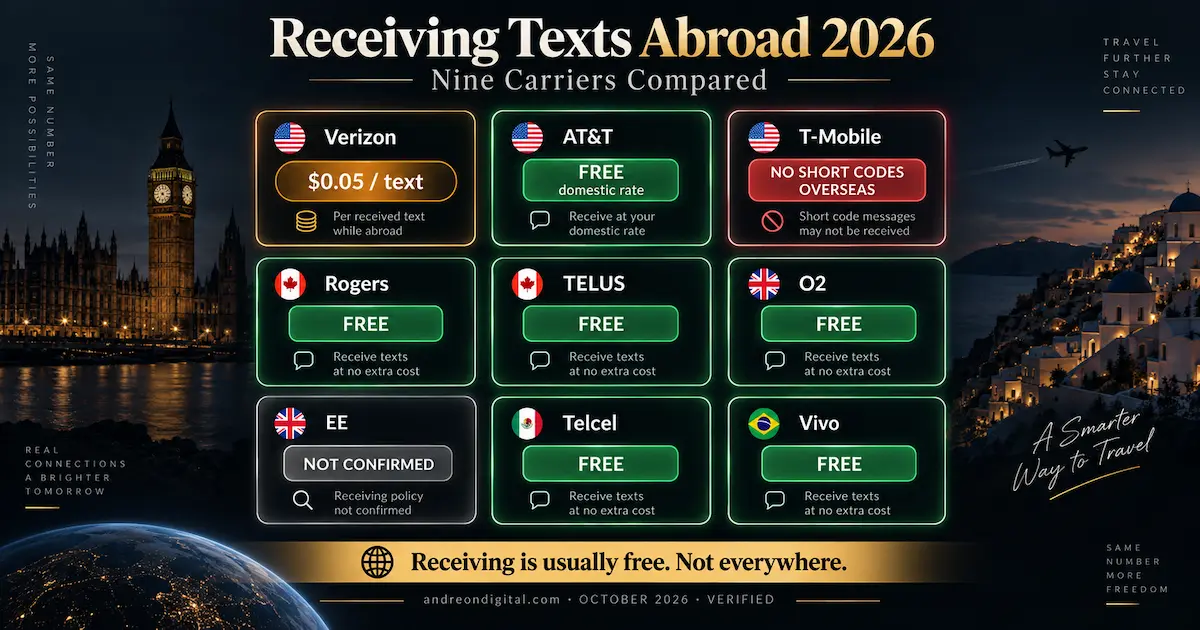
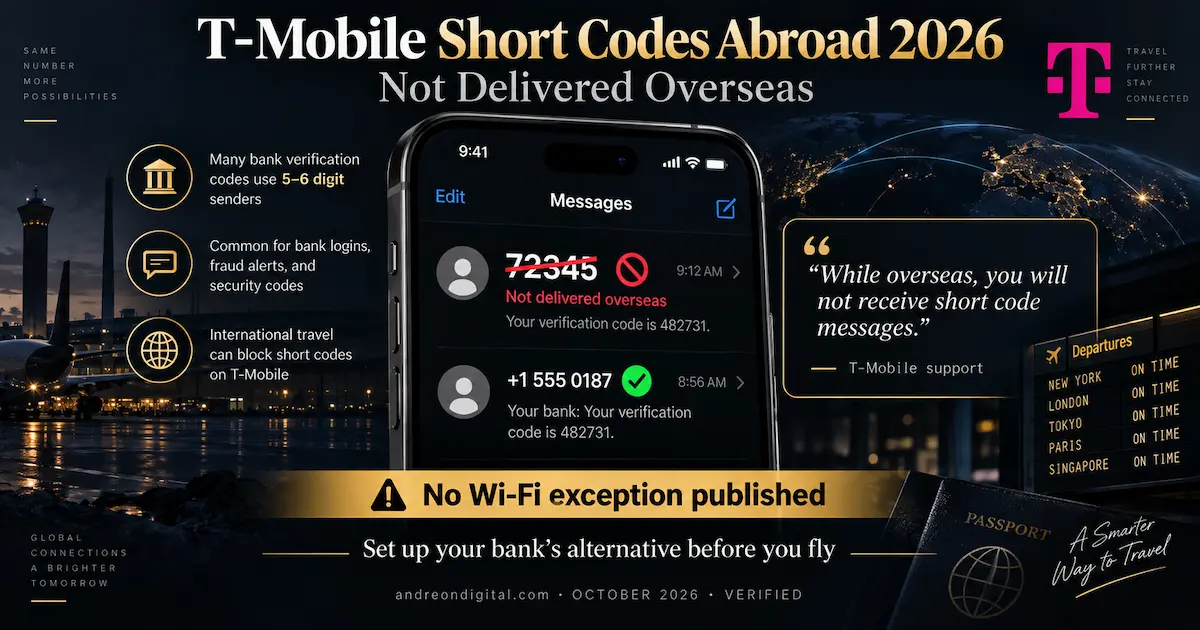
If you need to receive bank texts with a travel eSIM on T-Mobile, check how your bank sends codes before you leave. A regular SMS reaching you does not mean an automated short code will.
The Setup, Phone by Phone
| Phone | Set the travel eSIM for data | Keep the home line on | Check before you fly |
|---|---|---|---|
| 🍎 iPhone | Settings › Cellular › Cellular Data › travel line | Home line: Turn On This Line on · Data Roaming off | Settings › General › About › Carrier Lock shows No SIM restrictions |
| 🍎 iPhone, iOS 26 travel setup | Choose Travel eSIM and Current eSIM | ⚠️ Not “Travel eSIM Only” | The two options look similar and behave very differently |
| 🤖 Google Pixel | Settings › Network & internet › SIMs › data | Choose the SIM for calls and for texts separately | Two eSIMs at once depend on model and carrier |
| 🤖 Samsung Galaxy | Settings › Connections › SIM manager › mobile data | Both SIMs enabled · home line set for messages | Menus vary by region and software version |
| 🌍 Any phone | — | Ask your carrier to confirm international roaming is enabled on the account | EE customers can text ROAMING to 150 to check |
To receive bank texts with a travel eSIM on iPhone or Android, the key is which line stays active. Keep your original line available for SMS, even when the travel eSIM handles all mobile data.
SMS, iMessage, RCS and WhatsApp Are Not the Same Thing
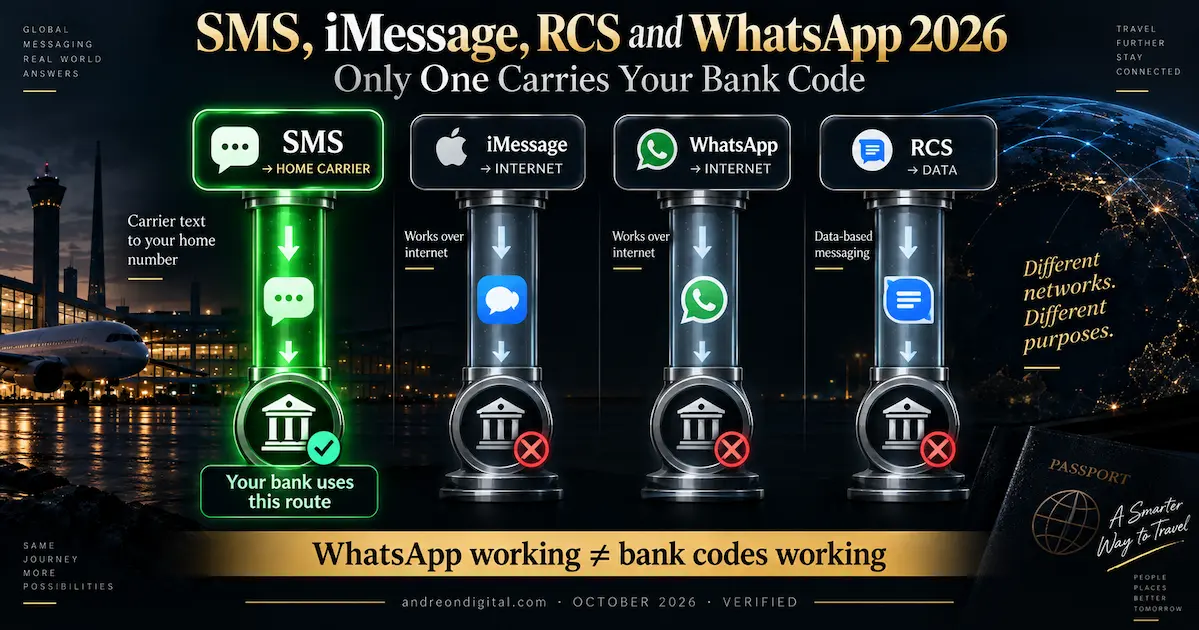
People trying to receive bank texts with a travel eSIM can mistake an iMessage or WhatsApp notification for proof that SMS is working. It is not: these services follow different delivery routes, so a message in an app says little about whether your bank’s ordinary SMS will arrive.
| Message type | Carried by | Works with home line off? | Proves your bank code will arrive? |
|---|---|---|---|
| ✉️ SMS | Your home carrier, to the line it was sent to | ❌ No | ✅ This is the one banks use |
| 🖼️ MMS | Your carrier, with its own data dependency | ❌ No | ❌ No. ⚠️ Apple warns data roaming settings on the data line can disable MMS on the voice line |
| 💬 iMessage | The internet, over Wi-Fi or the eSIM’s data | ✅ Yes | ❌ No. It is not SMS |
| 🟢 RCS | A carrier service running over data | Depends | ❌ No. A green bubble can be RCS, SMS or MMS |
| The internet, with your number shown as the account name | ✅ Yes | ❌ No. It does not turn a bank SMS into a WhatsApp message |
When the Codes Do Not Arrive
If you cannot receive bank texts with a travel eSIM after landing, do not start by buying more data. Use the symptoms below to check whether the problem is your home line, your carrier or the way your bank sends its codes.
| What you see | The likely cause | What to check |
|---|---|---|
| Internet works, no texts at all | The home line is off, not registered, or has no international service | Line switched on · roaming enabled on the account · a network shown for the home line. ⚠️ Buying more eSIM data will not help |
| Ordinary texts arrive, bank codes do not | A short code, the sender’s route, or your bank’s eligibility rules | The number your bank has on file · spam and filtered messages · whether you are on T-Mobile. Ask your carrier about short code restrictions |
| WhatsApp and iMessage work, nothing else does | Internet is fine, the carrier line is not | Test an ordinary SMS separately, not through an app |
| Codes arrive late or in bursts | Network delays or retries, especially at borders | Request a fresh code rather than reusing an old one, and use the bank’s alternative if offered |
| Nothing works and the trip is long | The route itself is unavailable | Use the bank’s own alternative method, or call the bank through an app |
The Bank Side: Set Up an Alternative Before You Fly
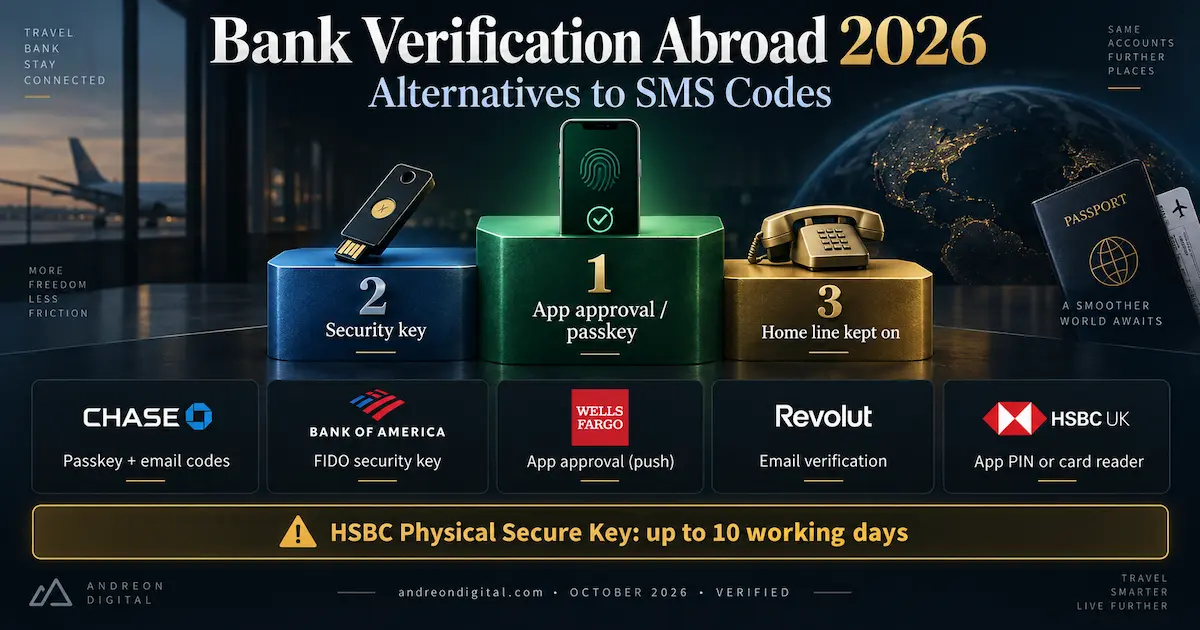
Even if you can receive bank texts with a travel eSIM, set up another way to verify your identity before departure. The most dependable backup is one your bank already supports, without needing a text to cross a border. Here are the alternatives five banks publish, so you know what to look for in your own account.
| Bank | When it sends a code | Alternatives it publishes | Set up before you leave |
|---|---|---|---|
| Chase 🇺🇸 | First login, unusual activity, digital wallets | Passkeys for sign-in · trusted device in the app · login codes by email | Security & Privacy › Enhance your Security › 2-step verification |
| Bank of America 🇺🇸 | ⚠️ International Secured Transfer needs a US mobile that can receive texts abroad | FIDO USB security key in eligible flows | Register and test the key. ⚠️ Removed after six months unused |
| Wells Fargo 🇺🇸 | Advanced Access for accounts, services, new recipients | Push approval in the app, which may work abroad · RSA SecurID if you hold one | App access and notifications. Keep the international support number |
| Revolut 🇬🇧 | Login and some operations | After the resend timer, choose email verification · passkeys | Email accessible on the same phone · app up to date |
| HSBC UK 🇬🇧 | Some online card purchases, if you do not use the app | Confirm in the app with a Mobile Banking PIN · card reader · Physical Secure Key | ⚠️ A Physical Secure Key can take up to ten working days to arrive |
Six Travel eSIMs, and What Each Says About Your Home Number
You do not need a special data provider to receive bank texts with a travel eSIM: the travel plan supplies internet access, while your home carrier handles incoming SMS. If you are still choosing where to start, compare our best eSIMs for Europe and international travel eSIM guide first. What differs between providers is what they document about keeping your main line on, and what they sell if you want a second number. Europe prices are the published one-off packages on 7 October 2026.
If you want to receive bank texts with a travel eSIM and keep European data costs low, Jetpac is the cheapest plan in this comparison. Its product page is clear about the two points that matter here. The data plan includes no SMS, and it supports dual SIM with your main number kept active for calls and texts, subject to your home carrier. That is exactly the setup in this guide. An unactivated package stays available for three months after purchase, so you can buy it well before you travel. For a direct provider comparison, see Jetpac vs Airalo. Our Jetpac review covers the app and its travel perks.
| Plan | USD | EUR | Note |
|---|---|---|---|
| Europe 5GB / 30 days | $16 | €15.50 | Data only |
| Europe 10GB / 30 days | $22 | €21 | Data only |
| Voice | Separate in-app voice product | Not your home number | |
Jetpac eSIM Video: Data Alongside Your Home Number
Watch our Jetpac overview to understand the travel data plan and how it fits a dual-SIM trip. The key distinction for banking remains that Jetpac supplies mobile data while your original carrier receives texts on your existing number.
After watching, keep your home line enabled, switch its data roaming off, and use Jetpac for mobile data. A travel data plan does not change where bank verification codes are sent.
Best for: the lowest-cost data alongside your home line, across 32 European destinations.
For anyone hoping to receive bank texts with a travel eSIM, Nomad’s own help centre is unusually clear. It states that its data packages do not provide verification texts for your main number, and tells you to use your main SIM for that. It also documents keeping your main SIM active while Nomad supplies the data, and notes that turning off data roaming on the main line does not switch off its calls or texts. Our Nomad review covers the wider range.
| Plan | USD | EUR | Note |
|---|---|---|---|
| Europe 5GB / 30 days | $17.50 | €15.55 | 35 destinations |
| Europe 10GB / 30 days | $23 | €20.44 | 35 destinations |
| Activation | Starts on connection, or automatically after 60 days | ⚠️ Do not buy too early | |
Nomad eSIM Video: Using a Data-Only Plan With Bank SMS
This Nomad video gives more context about the provider before you choose a Europe package. A Nomad data eSIM does not replace your registered bank number, and its own guidance says verification texts for your main number must still arrive on your main line.
Use the video to evaluate the data service, then confirm that your home SIM can roam for SMS and that your bank offers a backup sign-in method.
Best for: travellers who want a provider whose own documentation matches the setup in this guide.
To receive bank texts with a travel eSIM from Roamless, leave your original mobile line active. Roamless also has two number features that are easy to confuse with incoming SMS, so it is worth being precise. You can verify your main number in the app so outgoing calls display it. That does not forward texts sent to your main number into Roamless: its FAQ says those continue to arrive in your phone’s normal messages app, through your home line. Only Roamless Numbers receives texts inside the app, and that is a different number. Our Roamless review covers its pay-as-you-go model in full.
| Product | Price | What it does |
|---|---|---|
| Europe FIX 5GB / 30 days | $17.95 | Data only. USD only |
| Europe FIX 10GB / 30 days | $30.95 | Data only |
| ⚠️ Verified main number | Free | ⚠️ Shows your number on outgoing calls. Does not receive your texts |
| Roamless Numbers | $6.95 a month or $59.95 a year | A separate number, receiving included. Does not need a Roamless eSIM |
Roamless eSIM Video: Data, Caller ID and SMS Explained
Our Roamless video introduces the service, but there is an important distinction for bank security: showing your verified home number on outgoing calls is not the same as forwarding incoming bank messages.
Keep your home line active for verification codes. Roamless data and its separate Numbers product do not transfer your bank’s existing SMS destination.
Best for: flexible pay-as-you-go data, with your home line kept on for codes. Compare longer-term credit options in our no-expiry eSIM guide.
Airalo makes the distinction this guide depends on in its own documentation: installing an eSIM adds a line, it does not move your number, and keeping your original line active is separate from choosing Airalo for data. Its Eurolink plan is data only. Its Discover+ range is different, bundling data with minutes, texts and a new Airalo number, which is useful for calls and messages abroad and is not the number your bank knows. Our Airalo review covers both ranges.
| Plan | USD | EUR | What you get |
|---|---|---|---|
| Eurolink 5GB / 30 days | $19.50 | €18 | Data only |
| Discover+ 1GB / 7 days | $9 | €8.50 | Data, 10 minutes, 10 texts and a new number |
Airalo eSIM Video: Eurolink Versus a Second Phone Number
Watch this Airalo overview before choosing between a data-only Eurolink plan and a Discover+ plan with its own number. Neither option automatically changes the phone number your bank has registered.
Your bank codes continue to depend on your original carrier. Choose Airalo for data or a separate travel number, not as a guaranteed replacement for SMS authentication.
Best for: travellers who want an extra callable number for the trip, alongside a home line kept on for codes.
Saily’s support pages confirm you can keep your main line active alongside its eSIM on a dual-SIM phone, and they warn that using that line abroad can trigger your carrier’s charges. Its Phone Number add-on gives you a separate US number, and Saily is unusually candid about its limits: it acknowledges that some banks and financial apps refuse VoIP numbers, and its own compatibility list is based on user reports, can change and is not guaranteed. Our Saily review covers the security tools it bundles.
| Product | Price | Note |
|---|---|---|
| Europe 5GB / 30 days | €17.49 | ⚠️ USD not published in our collection |
| Europe 10GB / 30 days | €31.99 | — |
| ⚠️ Saily Phone Number | Add-on | ⚠️ A separate US number. May be classed as VoIP. MMS, short codes and forwarding restricted |
Saily eSIM Video: Travel Data and Verification Limits
This Saily video offers an overview of the eSIM service. For banking, the crucial detail is that its optional Phone Number feature provides a different number, and Saily warns that some financial services may reject VoIP numbers.
Even if the additional number works for ordinary calls, keep your home line on and test your bank’s supported alternative verification method before departure.
Best for: data beside your home line, from a provider that is honest about what its number can and cannot do.
aloSIM’s data eSIM has no phone number attached, and one of its own guides makes the right distinction between keeping your SIM on and turning off only its data roaming. It also promotes Hushed, a separate VoIP app that can run over aloSIM data, and here the documentation is the clearest warning in this whole comparison. Hushed’s own help centre states it cannot guarantee third-party verifications, including banks, explains that sending services may refuse VoIP numbers, and says it cannot change those policies or offer a replacement number to get around them. Our aloSIM review covers the data side.
| Product | Price | Note |
|---|---|---|
| Europe 5GB / 30 days | $19.50 | Data only. USD only in our collection |
| Europe 10GB / 30 days | $36 | Data only |
| ⚠️ Hushed number | Promotional offer | ⚠️ Separate VoIP app. Requires redemption and its own eligibility |
aloSIM eSIM Video: Mobile Data Without Losing Bank Texts
Our aloSIM video helps explain the travel data option. The provider’s associated Hushed service is a separate app-based number, not your existing bank number, and Hushed does not guarantee bank verification messages.
For a safer setup, leave your original SIM enabled for incoming SMS, disable only its data roaming, and let aloSIM handle your internet connection.
Best for: data beside your home line. Not as a reason to switch that line off.
FAQ, Receive Bank Texts With a Travel eSIM 2026
Final Verdict: Will Your Bank Codes Still Arrive?
In many cases you can receive bank texts with a travel eSIM, and the setup takes about five minutes. Your codes travel to your home line, not to your eSIM, so the eSIM you choose barely matters and your home carrier matters a great deal. Three rules decide the rest, and every one of them lives with your carrier.
- ✅ The setup: home line on, its data roaming off, travel eSIM as the data line, international roaming enabled on the account
- ❌ On T-Mobile: short codes are not delivered overseas, so set up your bank’s alternative before you go
- 💲 On Verizon pay-as-you-go: each received text costs $0.05. Cheap for codes, not for a group chat
- 📞 On AT&T and Verizon: answering a call starts a $12 pass. Let calls go to voicemail
- ✅ On O2: neither received texts nor received calls trigger O2 Travel, the friendliest setup here
- 🔐 Before you fly: a passkey, an app approval or a security key, whichever your bank offers
- 💶 For the data: Jetpac at $16 for 5GB in Europe, or Nomad at $17.50 across 35 destinations
Three things to carry away. Data roaming off is not the same as line off, and only the second stops your codes, which makes it the most common way people lock themselves out. WhatsApp and iMessage working proves nothing about your bank, because they run over the internet and your bank does not. And never move your bank to a travel number, because banks can refuse app-based numbers and the change can be hard to reverse from abroad. We are affiliates of the eSIM providers here, which on a question where every competing page is published by one is worth saying out loud.
This article contains affiliate links for the eSIM providers compared, and we may earn a commission at no extra cost to you. We have no relationship with any carrier or bank mentioned. This is a documentary audit of official sources rather than a field test, and is presented as such: we tested no texts, no verification codes, no Wi-Fi Calling and no bank sessions, accessed no bank accounts and requested no codes, and none of these results should be inferred.
Every carrier policy, device behaviour, bank authentication option, provider condition and price was read from the published source on 7 October 2026, covering nine carriers across the United States, Canada, the United Kingdom, Mexico and Brazil, 25 device findings from Apple, Google, Samsung and WhatsApp, five banks and six eSIM providers.
Where a source is silent, this guide records the point as unconfirmed rather than inferring an answer: EE’s consumer pages did not confirm a rate for received texts, so none is published here, and no carrier publishes a guarantee of delivery for bank codes or short codes.
Verizon’s exclusion of received texts from its TravelPass triggers is inferred from its published list of triggers, while its $0.05 charge per received text applies to international pay-as-you-go rates without TravelPass or International Monthly, or in destinations those do not include.
T-Mobile’s statement that short code messages are not received overseas is quoted from its own support page; not every bank code is sent from a short code. O2’s FAQ and terms describe the timing of its daily charge differently, which this guide does not resolve.
Telcel and Vivo positions come from general official pages rather than plan-by-plan terms. Bank alternatives are examples drawn from each bank’s public documentation and vary by account, market and operation; a login method does not necessarily cover transfers, new payees or card payments.
Separate number products, including Airalo Discover+, Saily Phone Number, Roamless Numbers and Hushed, are different numbers from the one registered with your bank, and their claims about verification codes are the providers’ own.
Prices are native quotations in USD and EUR with no conversion or coupons applied. Prices, policies and device behaviour change without notice, so confirm with your own carrier and bank before travelling.
Last verified: October 2026.
Keep Reading
The Rest of the Home-Number Question
- Wi-Fi Calling With a Travel eSIM 2026
- Best Travel eSIMs With a Phone Number
- AT&T International Day Pass vs Travel eSIM 2026
- Verizon TravelPass vs Travel eSIM 2026
- eSIM vs Physical SIM
The Providers in This Guide
- Jetpac eSIM Review 2026
- Nomad eSIM Review 2026
- Roamless eSIM Review 2026
- Airalo Review 2026
- Saily eSIM Review 2026
- aloSIM Review 2026
- Jetpac vs Airalo 2026
Devices and Setup
- eSIM Compatible Phones 2026
- How to Activate an eSIM
- eSIM Not Working, Nine Fixes
- Best eSIM for iPad Travel 2026